
Hazenfield Caisse
Your shop’s till, on a phone or a tablet. Even offline.
Hazenfield Caisse turns an Android phone or tablet into a till for shops that run on Hazenfield Cloud: grocery, hardware store, clothes shop, pharmacy. It sells all day even when the network drops, takes cash and mobile money, prints the receipt, and every sale lands in the shop’s books as if it had been made at the web till. The manager follows the day from their own phone.
- Android
- Google Play · phone and tablet
- Works with
- A Hazenfield Cloud subscription
- Price
- Free app, no ads
- Languages
- French, Malagasy, English
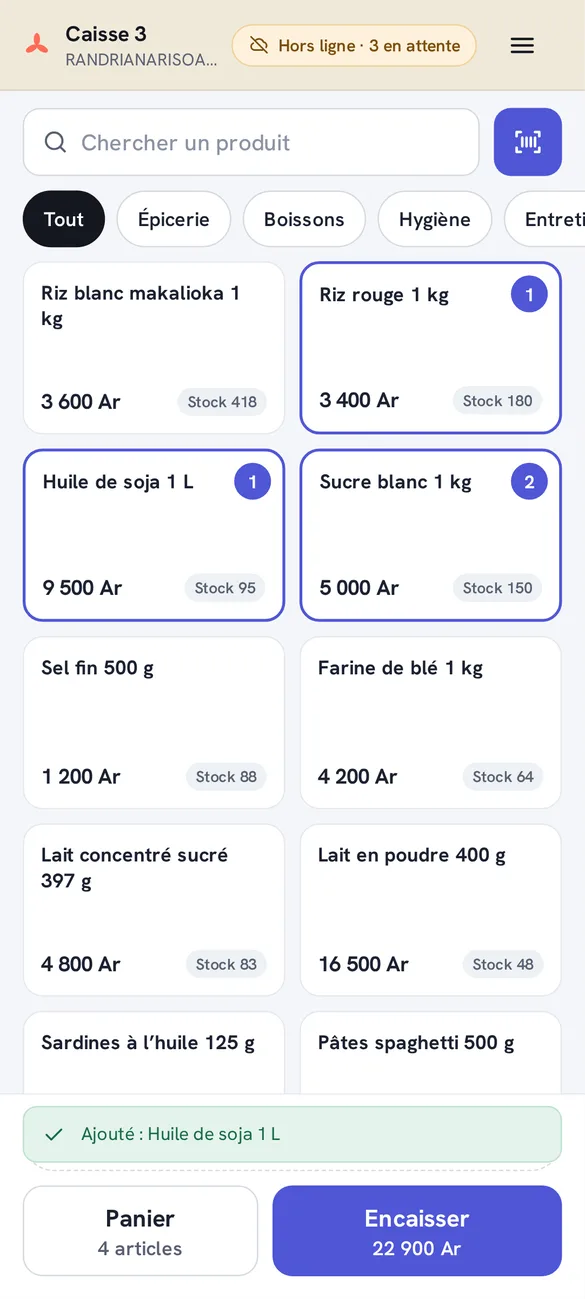
A full till in your pocket.
Everything a counter needs.
Sell quickly
Tap a product, search it by name, or scan its barcode with the camera or a plugged-in scanner. Customer prices, promotions and loyalty points apply on their own. For products tracked by batch, the till offers the one that expires first.
Cash, mobile money and credit
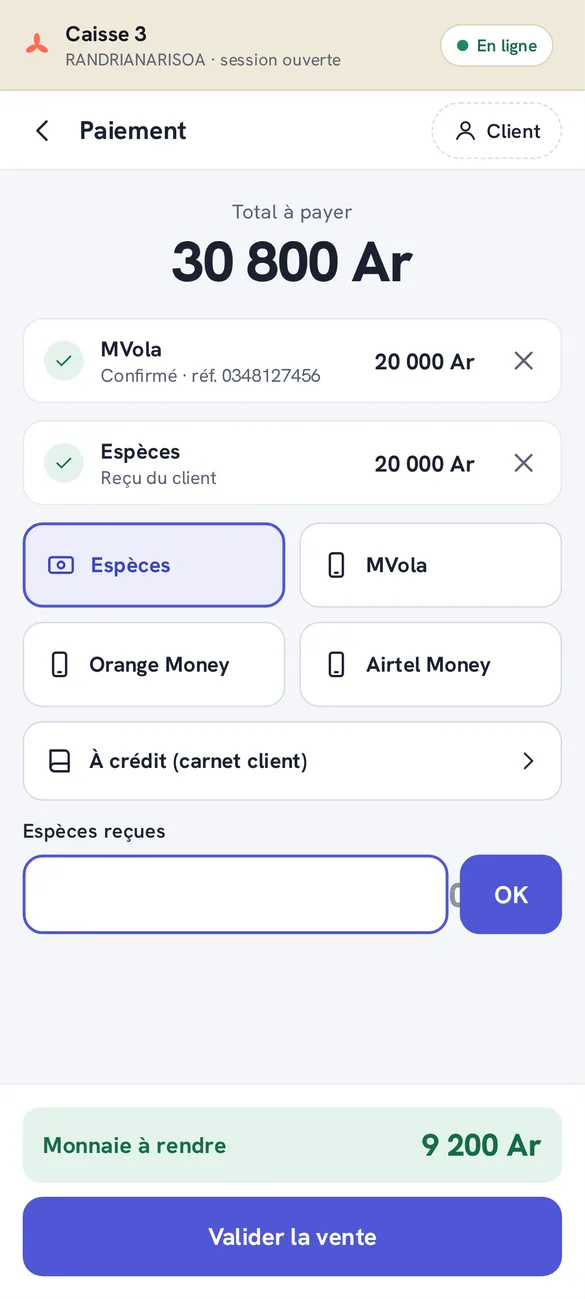
Cash with the change to give back, MVola, Orange Money and Airtel Money with the transaction reference, several methods in one sale. A known customer can buy on credit up to the limit you set, or pay with store credit.
The manager’s approval
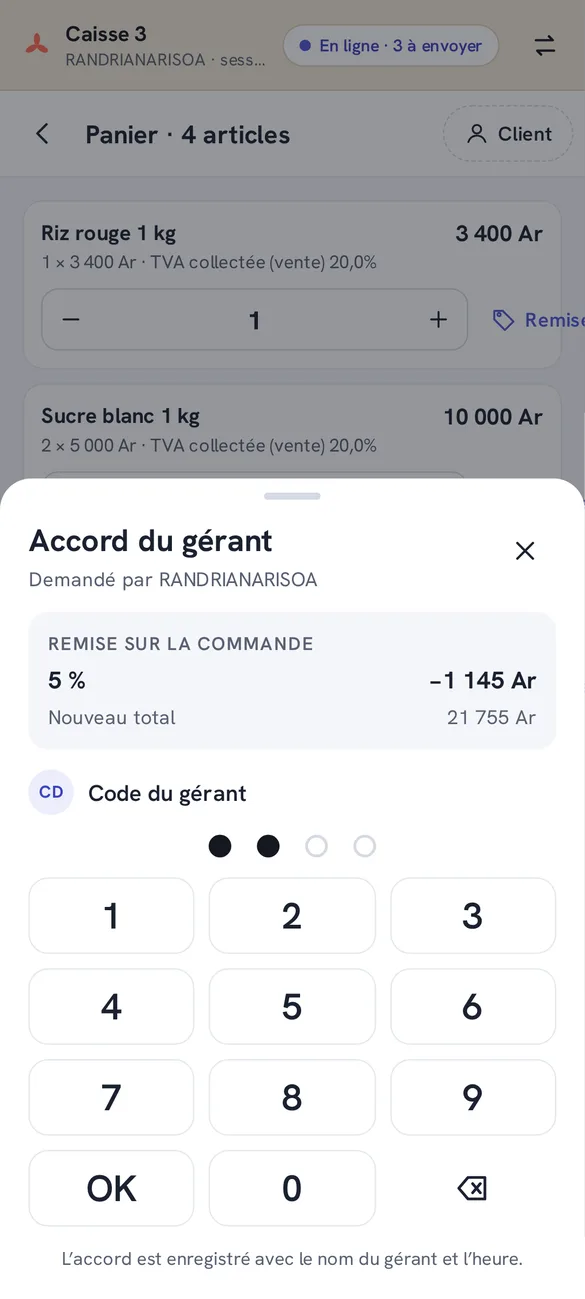
A discount, a refund, credit over the limit: the manager types their code on the till. Their name, the amount and the time are recorded.
Works without network
A whole day of sales stays on the phone and is sent in order as soon as the network is back. A sale sent twice is only counted once.
Receipts and closing
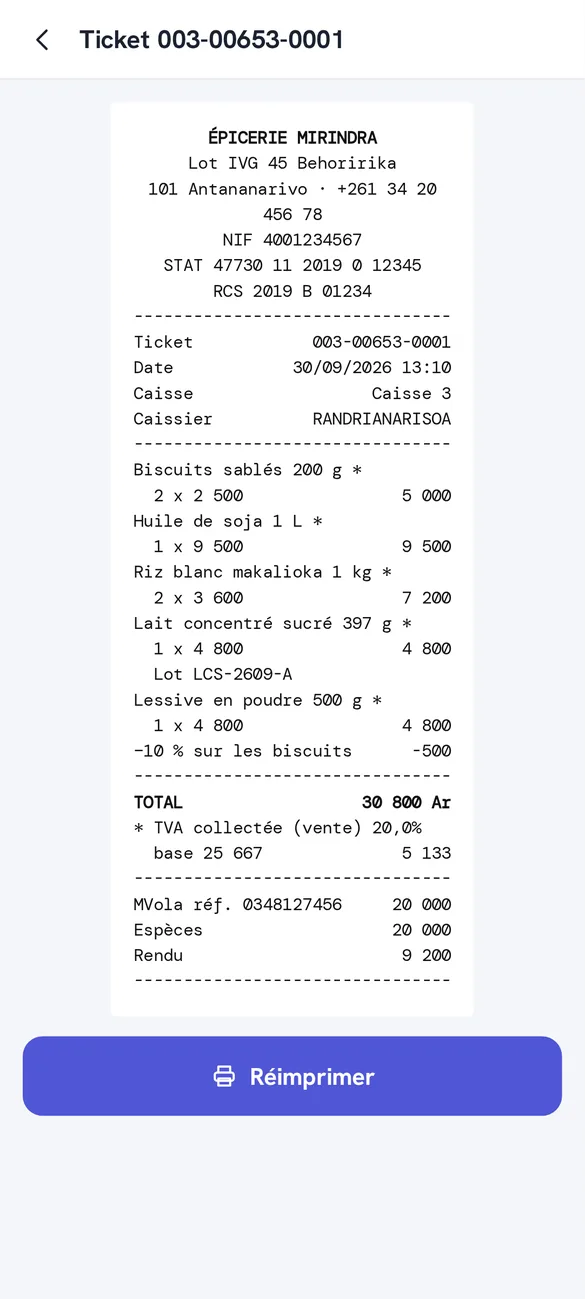
Receipts print on 58 and 80 mm Bluetooth printers, with the shop’s NIF, STAT, RCS and VAT by rate. At closing, each payment method is counted against what was expected.
The manager’s view
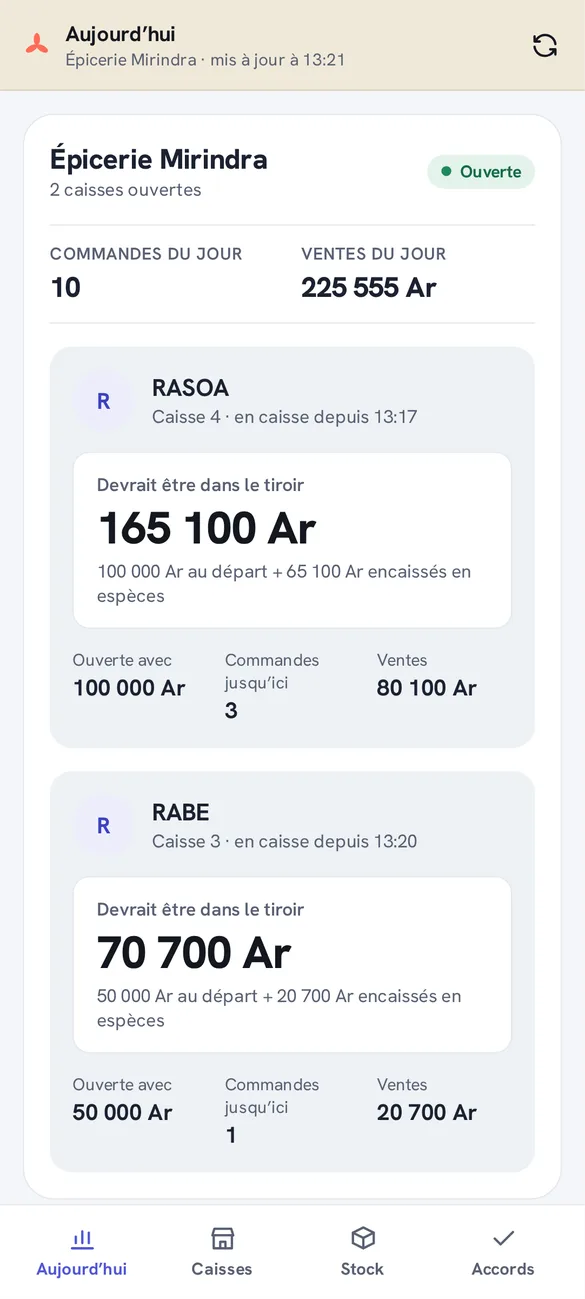
On their own phone or tablet, the manager sees who is at each till, the starting cash, what the drawer should hold now, the orders so far, stock alerts and approvals given.
From pairing to closing.
The shop sets up its tills, products, staff and payment methods in Hazenfield Cloud. The app follows those settings, so there is nothing to configure on the phone.
- 1
Link the phone
In Hazenfield Cloud, open the till and show its code. The phone scans it once and becomes that till.
- 2
Open the till
Each cashier opens with their own code and counts the starting cash.
- 3
Sell all day
Sales go to Hazenfield Cloud as they happen, or wait on the phone until the network is back.
- 4
Close
The cashier counts the drawer. Any difference is recorded and the manager is told.
Privacy statement
Last updated 30 September 2026
In short
Hazenfield Caisse is a work tool for shop staff. What it records about sales, customers and staff is sent to the shop’s own Hazenfield Cloud and nowhere else. The app contains no advertising and no analytics, and no data is sold. This statement covers the Hazenfield Caisse app; it is published by Hazenfield, Antananarivo, Madagascar.
Who is responsible for the data
The shop that uses the app decides what it records in its Hazenfield Cloud (its products, its customers, its sales and its staff) and is responsible for that information. Hazenfield runs the app and the Hazenfield Cloud service on the shop’s behalf, under the shop’s subscription, and uses the data only to provide that service.
What the app handles
Staff: the names of the cashiers and managers, so each sale and approval shows who did it. Till codes are checked on the phone against a scrambled copy; the code itself is never stored. A manager signs in with their Hazenfield Cloud email and password; the password is sent once to sign in and is not kept on the phone.
Sales: products, quantities, prices, discounts, payment methods and mobile money transaction references.
Customers, when the cashier picks one: name, phone number, loyalty points and amount owed on credit, as recorded by the shop.
The phone: its name, its model and the app version, so the shop can see which phones are linked to its tills, and an address for notifications.
What stays on the phone
The product list, the prices and the sales not yet sent are kept in the app’s own storage so the till works offline. Sign-in keys are kept in the phone’s protected storage. Unlinking the phone in Hazenfield Cloud, or uninstalling the app, removes them.
Camera, Bluetooth, fingerprint
The camera reads barcodes and the pairing code. No photo is taken or sent.
Bluetooth is used only to print on the receipt printer. The app does not use your location.
A manager may open their space with a fingerprint. The phone checks it; the app never receives it.
Notifications
Alerts to the manager and the till (a cash difference at closing, a stock alert, an approval) are delivered through Expo’s notification service and Google’s Firebase Cloud Messaging. They carry only the text of the alert.
Sharing and security
Apart from the notification services above, nothing is shared with anyone. Everything the app sends travels over an encrypted connection to the shop’s Hazenfield Cloud. Google Play may collect crash reports under its own policy.
How long it is kept, and your rights
Sales and customer records stay in the shop’s Hazenfield Cloud for as long as its subscription lasts and as long as accounting law requires. Customers and staff who want to see, correct or remove information about them should ask the shop first; they can also write to contact@hazenfield.com.
Children
The app is meant for shop staff and is not aimed at children.
Changes and contact
If this statement changes, the date above changes with it. Questions: contact@hazenfield.com.
Deleting an account
Last updated 30 September 2026
Whose account it is
Nobody creates an account inside Hazenfield Caisse. The shop creates one in its Hazenfield Cloud for each employee who uses the till: a cashier gets a till code, a manager gets a Hazenfield Cloud login. These are work accounts that belong to the shop, so it is the shop that closes them, and there is no sign-up or self-service account in the app to delete.
For the shop: closing an employee’s access
A cashier: in Hazenfield Cloud, open Employees, choose the person and archive them. Their till code stops working on every phone as soon as the till next refreshes its staff list, at the latest when the till is next opened.
A manager: in Settings, Users, choose the person and archive them. They can no longer sign in, and the manager space on their phone signs out the next time it connects, erasing what it had saved.
A phone: in the till’s settings, under the paired phones, choose Retirer. The phone stops being that till.
Archiving, then deleting
Archiving closes access at once and keeps the person’s name on past sales, refunds, approvals and cash counts, because the shop’s accounts must show who did what. Once the shop no longer has to keep those records, an administrator can delete the employee or the user for good. Hazenfield can do this for the shop on request.
For an employee: asking for your account to be deleted
Ask your employer first: they manage your access. If that is not possible, write to contact@hazenfield.com with your name and the name of the shop. We pass the request to the shop and, on its instruction, close your access and delete what can be deleted within 30 days.
What is deleted, and what is kept
Deleted: the till code or login, the manager’s saved sign-in, the addresses used for notifications, and everything the app kept on the phone.
Kept: your name on the shop’s past sales, refunds, approvals and cash counts, for as long as accounting and tax law require the shop to keep its records. They are deleted with those records.
Uninstalling the app erases what it kept on the phone, but does not close the account: only the shop can do that.
Terms of use
Last updated 30 September 2026
Using the app
Hazenfield Caisse is free to install. It only works with a Hazenfield Cloud subscription, and the subscription contract between the shop and Hazenfield applies to its use. By installing the app you accept these terms.
Codes and phones
The shop decides who gets a till code or a manager login, and is responsible for what is done with them. Keep codes to yourself. If a phone is lost or stolen, unlink it in Hazenfield Cloud straight away.
Payments
The app records how a sale was paid. A mobile money payment is made by the customer through their operator, under the operator’s own terms; Hazenfield never holds or moves the money. Check the operator’s confirmation before handing over the goods.
Hazenfield Caisse is not affiliated with, endorsed by or connected to MVola, Telma, Orange Money or Airtel Money. Their names are used only to say which services the till records.
Working offline
Sales made without network are kept on the phone until they are sent. If a phone is lost, broken or reset before it reconnects, the sales it had not sent are lost. Connect each phone regularly, and at least before closing.
Receipts and tax
Receipts show the details the shop has set in Hazenfield Cloud. The shop remains responsible for those details being right and for its own tax obligations.
Updates
The app is provided as it is and is updated from time to time. After an update of Hazenfield Cloud, an older version of the app may stop sending sales until it is updated from Google Play.
Liability
To the extent the law allows, and except as the subscription contract provides, Hazenfield is not liable for lost sales or income, for a payment made to the wrong account, or for losses caused by a network, power or operator outage.
Changes
These terms may be updated with the app. The date above shows the current version. Continuing to use the app means accepting the updated terms.
Law
These terms are governed by the law of Madagascar.
Questions about the app, this statement or these terms: contact@hazenfield.com