
Vola Vita
Mobile money transfers, in two taps.
Vola Vita prepares MVola transfers for you. Pick a favourite, a contact or type a number, enter the amount, and the app writes the full transfer code. On Android it dials it; on iPhone it copies it for you to paste into the Phone app. Every transfer is kept in a history you can tag, search and export to Excel. The name is Malagasy: vola is money, vita is done.
- Android
- Google Play · in testing
- iPhone
- App Store · coming soon
- Price
- Free, no ads
- Language
- French
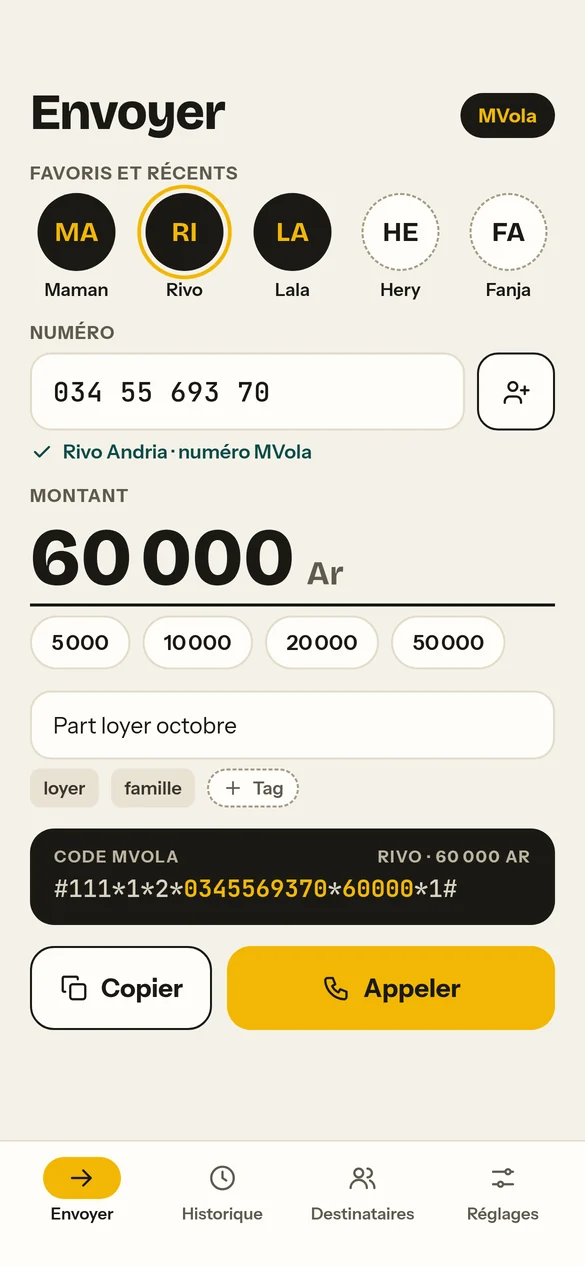
Five screens, one job.
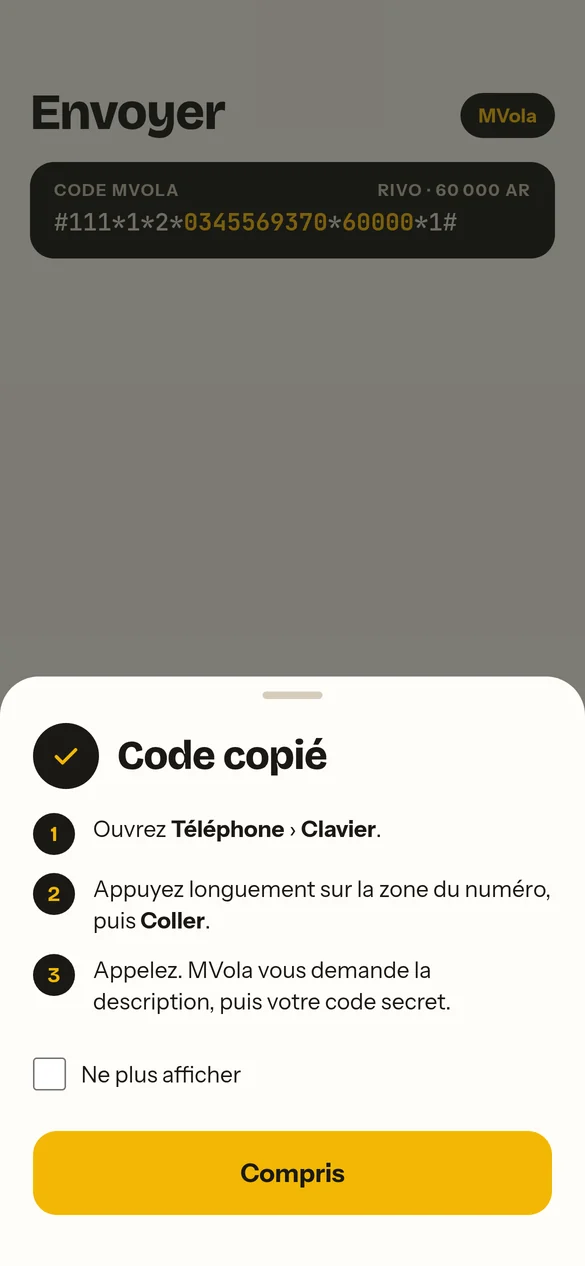
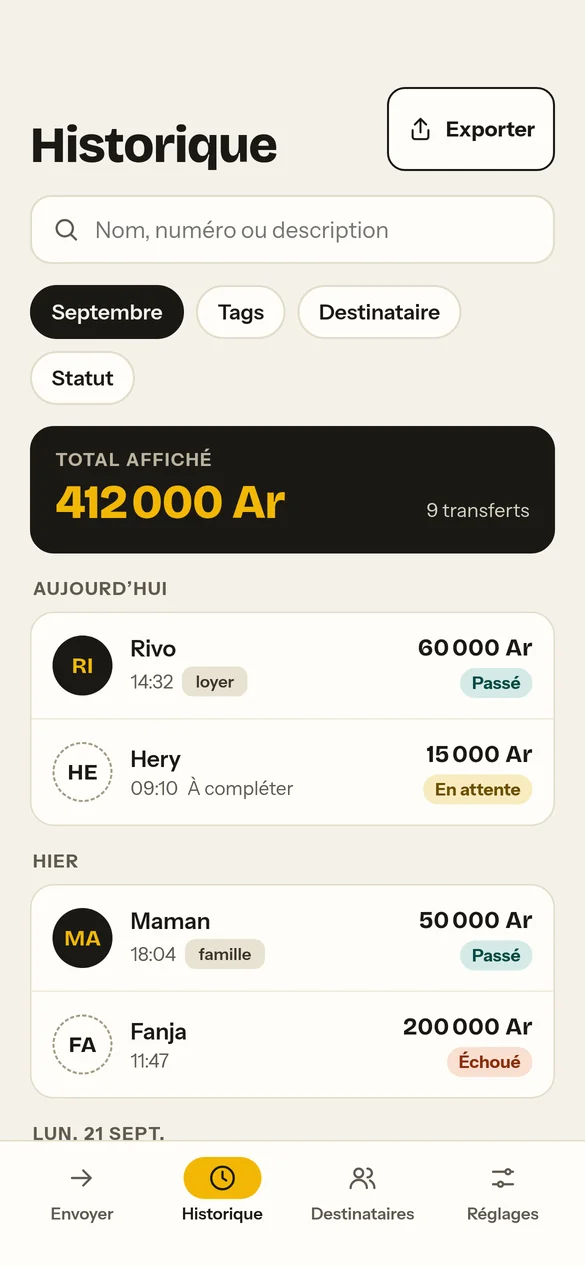
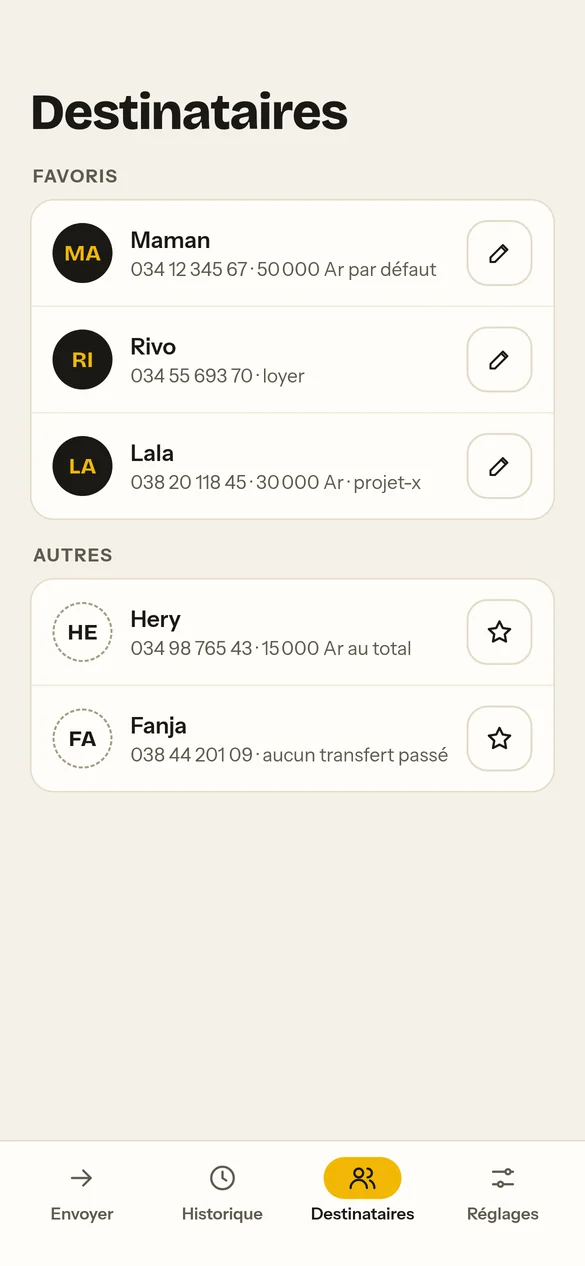
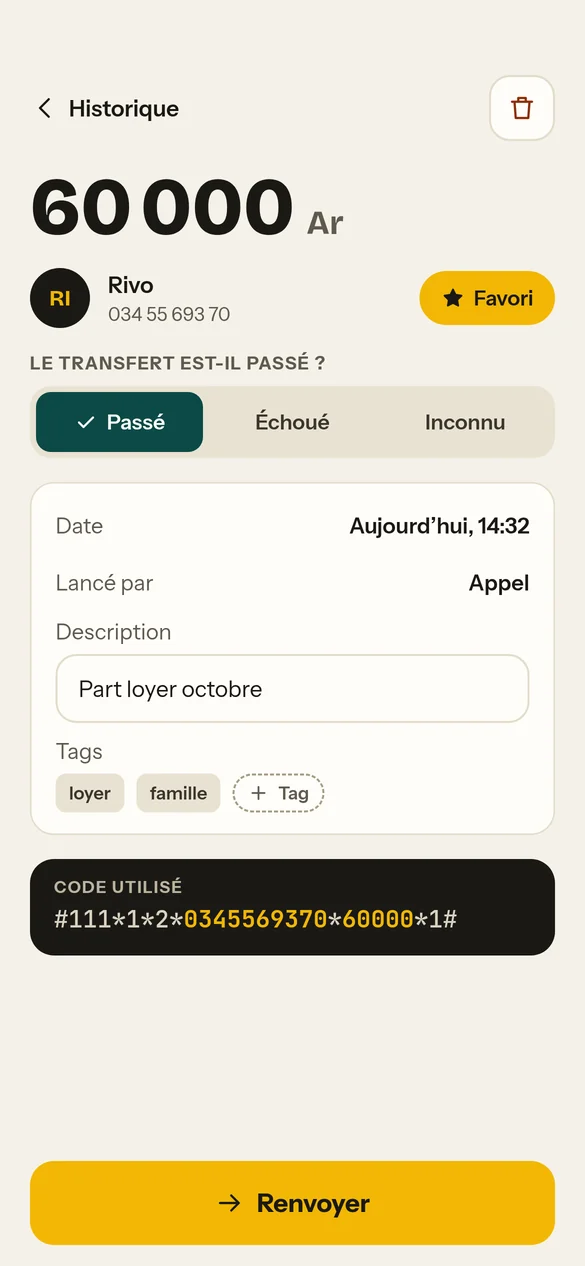
Less typing, fewer mistakes.
The full code, written for you
No more typing #111*1*2*… by hand. One wrong digit sends money to the wrong person; the app builds the code from the number and the amount.
Contacts in the right format
A number saved as +261 34 55 693 70 becomes 0345569370 automatically. Search stays instant with thousands of contacts.
Favourites
The people you pay often sit at the top, each with an optional nickname, default amount and tags.
History and tags
Every transfer is saved with its date, amount, description, tags and whether it went through. Filter by month, tag, person or status.
Excel export
Send the filtered history to Excel or Google Sheets for your accounts, in one tap.
Nothing leaves the phone
No account, no server, no tracking. Your MVola PIN is never asked for or stored.
A shortcut through the MVola menus.
MVola works through the menus that appear when you dial #111#. Each * followed by a number picks a menu item, so one code can walk through several menus at once. Vola Vita builds that code; MVola does the rest, on its own screen.
- 1
Choose who and how much
A favourite, a contact or a typed number, then the amount in ariary.
- 2
Call or copy
Android runs the code directly. iPhone copies it, because Apple does not let apps dial codes containing * or #.
- 3
Confirm with MVola
MVola's own screen asks for the description and your PIN. The app never sees either.
- 4
Note the result
Back in the app, one tap records whether the transfer went through.
Privacy statement
Last updated 29 September 2026
In short
Vola Vita does not collect any personal data. It has no account, no server and sends nothing over the internet. It contains no advertising and no analytics. This statement covers the Vola Vita app; it is published by Hazenfield, Antananarivo, Madagascar.
What stays on your phone
The app keeps, only in your phone’s own storage: the transfers you start (date, number, name, amount, description, tags and result), your favourites (number, nickname, default amount and tags) and your settings.
This information is deleted when you uninstall the app. It leaves your phone only if you use the Export button yourself, to a destination you choose.
Contacts
If you allow it, the app reads your contacts so you can pick a recipient. It keeps only the name and number of the contact you choose. Nothing is sent anywhere. You can withdraw this permission at any time in your phone’s settings and type numbers by hand.
Phone calls (Android)
If you allow it, the app dials the transfer code for you. It has no access to any other call. Without this permission, it opens the keypad with the code filled in instead.
Clipboard
When you tap Copy, the app puts the transfer code, and on Android the description, on your phone’s clipboard so you can paste them. It does not read the clipboard.
Your PIN
Your mobile money PIN is typed into your operator’s screen, never into Vola Vita. The app cannot see it and does not store it.
Children
The app is not aimed at children and collects no data from anyone.
Changes and contact
If this statement changes, the date above changes with it. Questions: contact@hazenfield.com.
Terms of use
Last updated 29 September 2026
Using the app
Vola Vita is free for personal use. By installing it you accept these terms.
What the app does, and what it does not
The app prepares a transfer code and hands it to your phone. The transfer itself is carried out by your mobile money operator, under its own terms. Hazenfield is not a party to your transfers and never holds or moves your money.
Your responsibility
Before entering your PIN, check the number and the amount shown on your operator’s screen. Once confirmed, a transfer cannot be undone by the app. The history in the app is a personal record, not proof of payment: your operator’s confirmation message is.
Operators
Vola Vita is an independent app. It is not affiliated with, endorsed by or connected to MVola, Telma, Orange Money or Airtel Money. Their names are used only to say which services the app works with. Operator fees and limits apply, and an operator may change its codes at any time, which can stop the app from working until it is updated.
No warranty
The app is provided as it is, without any guarantee that it will be free of errors or always available.
Liability
To the extent the law allows, Hazenfield is not liable for any loss arising from a transfer, including one sent to the wrong number or for the wrong amount, from an operator outage, or from a change to an operator’s codes.
Changes
These terms may be updated with the app. The date above shows the current version. Continuing to use the app means accepting the updated terms.
Law
These terms are governed by the law of Madagascar.
Questions about the app, this statement or these terms: contact@hazenfield.com